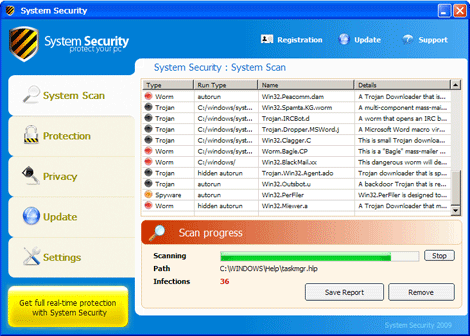
Fake Anti-Virus stops programs, making you buy their program to remove their malware.
This has been going on for some time and it is getting worse. I have had this happen to a many of my client and have ran into this breed just recently. I had to use Microsoft's MRT to scan and give me a hand and prc viewer to kill the processes as they came to play. I also used AVG's old root kit remover that is no longer available BEFORE I could INSTALL or RUN any other software such as Malware Bytes, Spybot and other programs as well. I couldn't even completely kill it in safemode. I would removed the files manually but they would reduplicate themselves. I found that with these types of infections, if you do a search for all files, including hidden and system files by date modified it is so much quicker. The last one I removed was so nasty I couldn't even run ComboFix on it, until followed through on the above.
Read what TrendLabs has to say below.
Taken from Malware Blog
Posted Jul26 2009
Rogue Antivirus Terminates EXE Files
9:02 pm (UTC-7) by Erika Mendoza (Threat Response Engineer)
This weekend, we at TrendLabs came across a FAKEAV variant similar to the one peddled in the solar eclipse 2009 in America attack in this recent blog post. This one, however, introduces another new scare tactic (so far the latest new ploy we’ve seen is the ransomware/FAKEAV that encrypts files in the infected computer and offers a bogus fixtool for a price).
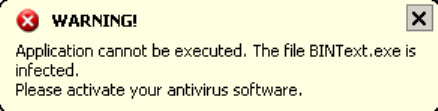
This FAKEAV variant terminates any executed file with an .EXE file extension and displays a pop-up message saying that the .EXE file is infected and cannot execute.
This way, users are left with no choice but to activate the antivirus product since no other application works. This Trojan is detected by Trend Micro as TROJ_FAKEAV.B. It avoids terminating critical processes to prevent system crashes.
Unfortunately, cybercriminals work hard in creating so many gimmicks, that we can only guess what comes next in FAKEAV. Fortunately though, the Trend Micro Smart Protection Network provides users protection from such threats.Read more: http://blog.trendmicro.com/rogue-antivirus-terminates-exe-files/#ixzz0MfvDHv92
Contact a professional to help you:
Computer Repair Lakeland, FL
Wednesday, July 29, 2009


Wednesday, July 22, 2009
How Much Is A Petabyte?
Tech Terms defined it as: A petabyte is 1,024 terabytes and precedes the exabyte unit of measurement. Since even the largest hard drives are measured in terabytes, petabytes are only used to measure the storage space of multiple hard drives or other collections of data.
Mozy has a picture definition for you:
What is a Petabyte?
Offsite Backup Solutions Offsite Backup (Data Loss is a hard and costly lesson) Set it and forget it with Mozy, offsite backup
2GB Totally Free Online Backup! Compliments of Mozy
Contact a professional to help you:
Computer Repair Lakeland, FL
Mozy has a picture definition for you:
What is a Petabyte?
Offsite Backup Solutions Offsite Backup (Data Loss is a hard and costly lesson) Set it and forget it with Mozy, offsite backup
2GB Totally Free Online Backup! Compliments of Mozy
Contact a professional to help you:
Computer Repair Lakeland, FL


Monday, June 29, 2009
"The local policy of this system does not permit you to logon interactively"
This happened after someone made some changes to their group membership and locked themselves out of everything. You can't be a member of EVERYTHING in the list.
Rule of thumb here is DENY always overrules ALLOW.
He couldn't log in locally anymore, or remotely for that matter.
"The local policy of this system does not permit you to logon interactively"
Turns out this person had been playing and added him to a group that was denied permission to log in locally.
This just may be the case in your event. If so then check the group membership for such a person. Or maybe Group Policies.
Here is a link that may help:
http://support.microsoft.com/kb/841188
Or maybe you can try this one.
Start
Run
secpol.msc
Navigate to “Local Policies”, then select “User Rights Assignment”.
Find “Allow logon through Terminal Services”. Check and make sure that “Administrators” and “Remote Desktop Users” are in the list. If they aren’t, click “Add User or Group”, and add the user.
Apply and Test
Contact a professional to help you:
www.MyComputerGirl.com
863-512-1079
Rule of thumb here is DENY always overrules ALLOW.
He couldn't log in locally anymore, or remotely for that matter.
"The local policy of this system does not permit you to logon interactively"
Turns out this person had been playing and added him to a group that was denied permission to log in locally.
This just may be the case in your event. If so then check the group membership for such a person. Or maybe Group Policies.
Here is a link that may help:
http://support.microsoft.com/kb/841188
Or maybe you can try this one.
Start
Run
secpol.msc
Navigate to “Local Policies”, then select “User Rights Assignment”.
Find “Allow logon through Terminal Services”. Check and make sure that “Administrators” and “Remote Desktop Users” are in the list. If they aren’t, click “Add User or Group”, and add the user.
Apply and Test
Contact a professional to help you:
www.MyComputerGirl.com
863-512-1079
Subscribe to:
Posts (Atom)